TL;DR – Modernizing Academic Operations
Deploying a robust, modern school management system is the single most impactful administrative upgrade an educational institution can execute. By transitioning away from disparate, legacy data silos, schools can integrate critical workflows—ranging from grade-books and student billing to transportation networks and physical facility upkeep. Leveraging specialized tools like facilities management software for schools, school event management software, and after school program management software enables administrators to optimize resource utilization, secure campus access, automate scheduling, and improve communication channels. Ultimately, a unified school-wide digital ecosystem reduces overhead, mitigates physical liabilities, and enhances the overall learning experience for students, parents, and educators alike.
DLR – Deep Look & Detailed Reading Checklist
For administrative leadership, chief technology officers, and facilities directors seeking a complete overview of active modules within a premium enterprise-grade school software ecosystem, this DL;DR matrix outlines the core functional pillars that define a high-performance educational environment:
- Infrastructure Security & Upkeep: Integrating cloud-native facility management software for schools and modern school visitor management software to manage physical classrooms, preventive maintenance tickets, and check-in security checkpoints.
- Specialized Academic Programs: Orchestrating extended care registration and billing through after school program management software, alongside handling athletic activities, room reservations, and community gatherings via dedicated school event management software.
- Asset Control & Inventory Optimization: Utilizing specialized school asset management software to track depreciating IT hardware (smartboards, laptops) and inventory management software for schools for daily physical consumables (science chemicals, textbooks, cafeteria stock).
- Transit Safety & Crisis Readiness: Deploying predictive school bus fleet management software for vehicle diagnostics, alongside real-time routing from school bus management software, while establishing emergency broadcast protocols via school emergency management software.
1. The Architectural Shift: The Evolution of School Administration
For generations, the administrative backbone of educational institutions was composed of heavy, bound paper ledgers, filing cabinets stuffed with physical records, and isolated spreadsheets managed by individual departments. The finance director kept tuition ledgers in one program, the scheduling coordinator manually drew up course timetables on a white-board, and the facilities manager reacted to broken boilers by collecting verbal requests. This heavily siloed operational structure was not only inefficient, but it also introduced massive data discrepancies, opened paths for administrative errors, and compromised overall student security.
During the 1970s and 1980s, the administrative offices of high schools and universities were defined by massive physical record rooms. These storage spaces housed millions of sensitive paper files, including student health records, academic transcripts, disciplinary logs, and tuition payment histories. Maintaining these physical records required a significant investment in real estate and introduced severe safety hazards, as these rooms were highly vulnerable to devastating fires, water damage from burst pipes, structural mold, and simple misplacement by staff members. When a student transferred or graduated, locating their records could take hours or even days, causing severe delays for families and administrators.
The introduction of early computerized databases in the 1990s was supposed to solve these issues, but instead, it created “siloed digital pockets.” The admissions office used one software program, the registrar’s office used another, and the transportation team relied on localized spreadsheets. Because these systems could not communicate with each other, administrators had to manually copy and paste data between programs, leading to data errors, outdated records, and security loopholes. For example, if a parent updated their contact information in the registrar’s database, the change was rarely shared with the transportation department, leaving school bus drivers with outdated emergency contact records.
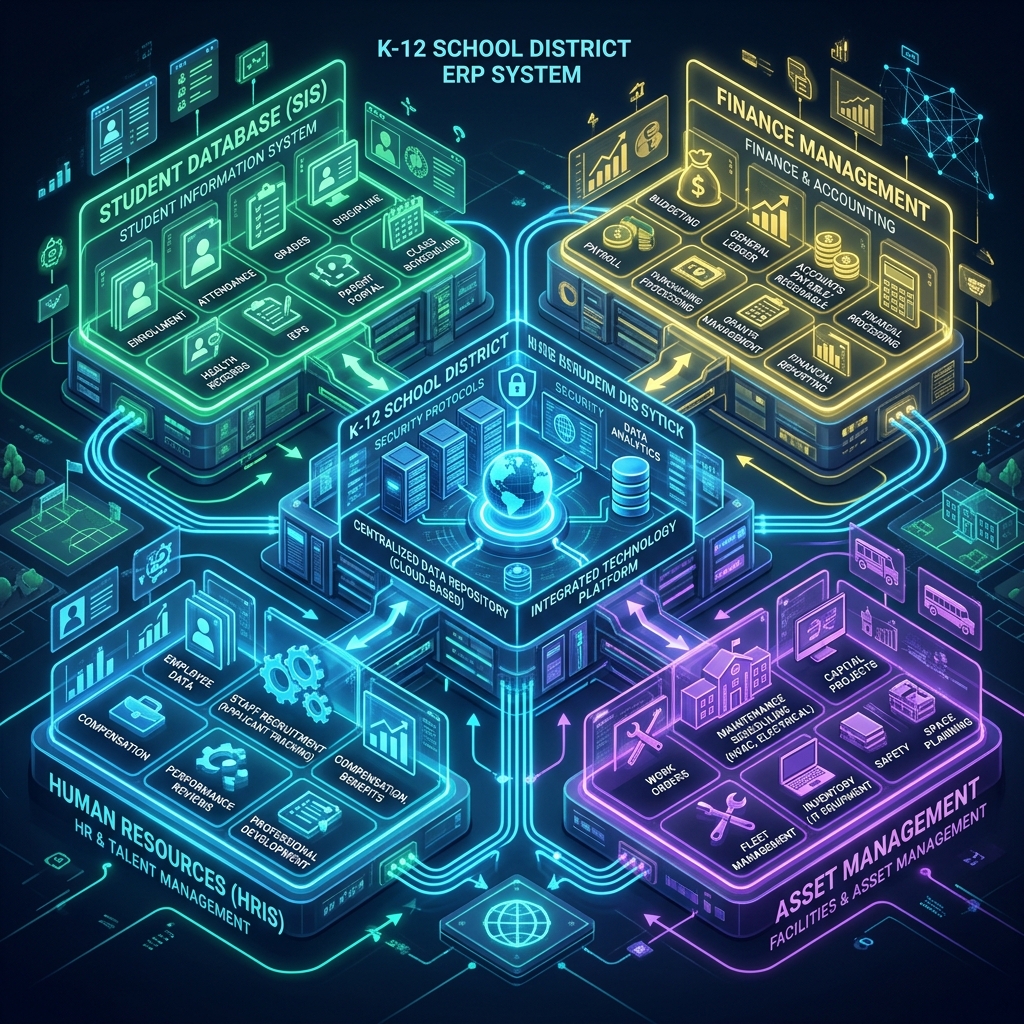
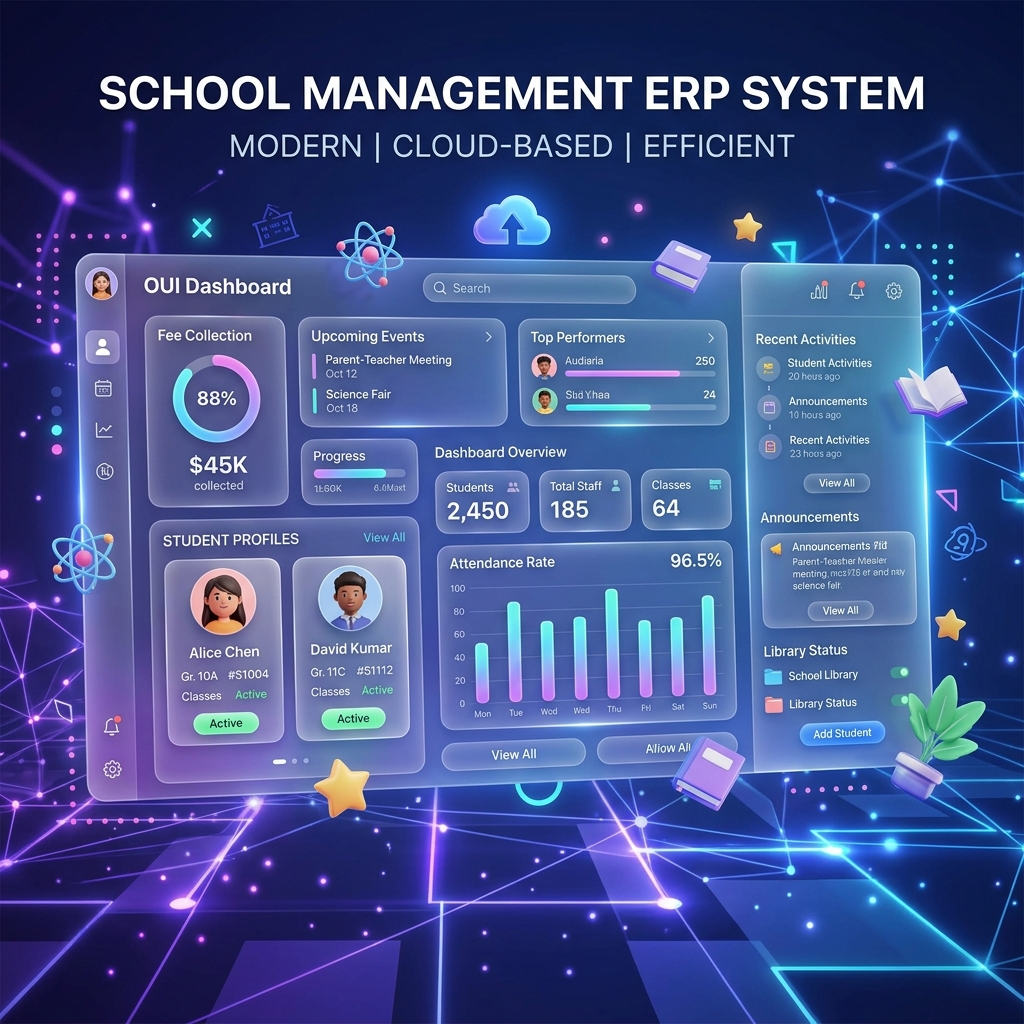
Today, the operational demands on K-12 districts and higher education environments have reached unprecedented levels of complexity. Institutions are no longer just centers of academic instruction; they are multi-million dollar corporations managing complex physical infrastructure, diverse logistics networks, delicate safety guidelines, and extensive asset investments. To successfully navigate this evolving landscape, modern administrators are adopting integrated school management software suites. This comprehensive guide details how unifying operations under a single digital ecosystem transforms educational management, optimizes budgets, and ensures safety across the board.
The transformation is driven by the realization that physical infrastructure, student safety, assets, and scheduling are deeply interconnected. For instance, when a student registers for an enrichment course, that simple academic action triggers a chain reaction across multiple operational layers: a classroom must be booked via school facility management software, parents must pay tuition using specialized billing portals, attendance must be registered, and transportation routes must adjust via school bus management software. A unified system automates this flow seamlessly, ensuring data flows instantly and accurately between all departments.
According to recent highlights in school management software news, districts that have transitioned to fully integrated, cloud-native administration platforms report a 35% reduction in administrative overhead, a 50% improvement in response times for maintenance tickets, and substantially higher parent satisfaction rates. By eliminating manual data entry and replacing disjointed systems with single-source-of-truth architectures, educational enterprises can redirect their precious financial resources away from administrative firefighting and straight back into the classroom where they belong.
2. Managing the Physical Campus: Facilities & Infrastructure Software
A school’s physical campus represents one of the largest capital investments a community makes. Classrooms, science laboratories, gymnasiums, sports complexes, theater halls, and cafeteria facilities require constant supervision, continuous maintenance, and detailed scheduling. To keep academic campuses running at peak operational capacity, implementing dedicated facilities management software for schools is no longer a luxury—it is an absolute operational necessity. Without a centralized system, maintenance requests are lost in email threads, minor repairs escalate into major system breakdowns, and valuable rooms remain empty due to scheduling conflicts.
When educational institutions integrate a comprehensive, enterprise-level facility management software for schools, they can transition from a costly reactive maintenance posture to a highly cost-effective proactive operations strategy. The system acts as a digital dispatch, receiving work orders directly from teachers and staff, automatically routing them to the correct maintenance technicians, tracking labor and material costs, and recording complete maintenance histories. This ensures that minor issues, such as a leaky valve or a flickering ballast, are addressed promptly before developing into costly classroom closures.
Furthermore, structural health and environmental safety are critical aspects of modern campus management. Modern facilities management software for schools integrates directly with internet-of-things (IoT) environmental sensors to monitor classroom air quality. Scientific research demonstrates that high levels of carbon dioxide (CO2) in crowded classrooms significantly reduce student concentration, cognitive function, and academic performance. By tracking IAQ (Indoor Air Quality) metrics in real-time, the system can automatically adjust school ventilation systems to bring in fresh air, ensuring a healthy, high-performance learning environment.
Beyond daily repairs, proactive maintenance scheduling is where the true value of modern school facilities management software shines. Administrators can schedule automated reminders for major infrastructure systems, including heating, ventilation, and air conditioning (HVAC) filter changes, structural roof inspections, boiler testings, and fire alarm inspections. This automated scheduling extends the overall lifespan of extremely expensive school infrastructure assets by up to 25%, saving taxpayers millions of dollars in premature replacement costs while maintaining a comfortable, safe, and healthy environment for students to learn in.
Safety tracking also includes monitoring water systems to prevent dangerous biological outbreaks. Centralized school facilities management software schedules and tracks routine pipe flushing and thermal shock procedures in sports facilities and science wings. This keeps the campus fully compliant with municipal health and safety codes and protects students and staff from waterborne pathogens such as Legionella. By automating these compliance workflows, schools can easily generate clean audit records for health inspectors with a single click, eliminating the risk of costly fines or closures.
Reactive Maintenance vs. Proactive Facility Management
Understanding the stark operational and financial differences between historical, ad-hoc maintenance methods and a modern, software-driven facility strategy is critical for school leadership teams:
- Reactive Maintenance (The Old Model): Repairs are performed only after a system fails. This introduces emergency vendor fees, disrupts classes, shortens equipment lifespan, and increases labor costs.
- Proactive Maintenance (The Software Model): Scheduled inspections and servicing are performed using facilities management software for schools. This prevents system failures, extends asset lifespan, allows for off-peak work scheduling, and keeps operational budgets completely predictable.
- Campus Energy Optimization: Integrated systems monitor real-time utility consumption, automatically turning off HVAC systems and lighting when school facility management software schedules show a classroom or auditorium is empty.
Another major operational challenge solved by modern software is building scheduling and community space utilization. A typical school campus hosts a wide array of activities outside of standard school hours, such as community sports leagues, local theater groups, parent associations, and adult education courses. An integrated school facility management software portal provides a public-facing reservation platform where external organizations can view real-time room availability, submit formal rental requests, sign digital liability waivers, and pay rental fees. This centralizes the booking process, prevents double-booking errors, and generates a reliable stream of auxiliary revenue for the school district.
Energy management is also a core benefit of modern scheduling integration. When external bookings are approved, the central school facility management software coordinates directly with smart building systems. Rather than keeping an entire building heated or cooled for an evening community meeting, the software directs HVAC and lighting systems to activate only in the specific rooms and hallways scheduled for use. This smart zoning significantly reduces energy waste, lowers utility bills, and supports the district’s carbon reduction and environmental sustainability goals.
Simultaneously, the internal scheduling features within school facilities management software coordinate custodial services around scheduled events. The system automatically creates cleaning tasks for custodial teams as soon as an event booking is finalized, ensuring that rooms are clean, well-lit, and properly heated or cooled before the guests arrive, and restored to standard educational configurations immediately afterward. This level of operational automation minimizes scheduling friction, reduces custodial overtime costs, and ensures that the school facility is utilized to its absolute maximum potential.
3. Beyond the Standard Classroom: Specialized Event and After-School Management
The operational duties of a modern school extend far beyond the final afternoon bell. Schools are dynamic centers of community activity, hosting extracurricular sports leagues, academic competitions, visual art exhibitions, musical performances, holiday celebrations, and extensive after-school enrichment courses. Coordinating these events manually using spreadsheets, paper forms, and cash payments is a recipe for administrative chaos. It increases the risk of double-bookings, leaves schools vulnerable to accounting errors, and compromises safety by failing to provide accurate rosters of students on campus after hours.
From scheduling parent-teacher conferences to planning district-wide science fairs, school event management software provides the centralized logistics engine required to organize, track, and execute complex educational events. The software allows coordinators to manage vendor agreements, ticket sales, room setups, audio-visual equipment allocations, and VIP seating charts from a single, unified dashboard. By integrating this module directly with the school’s central database, student rosters and parent contact profiles are populated automatically, saving staff hundreds of hours of manual data entry for every major event.
Furthermore, this software facilitates smooth communication with attendees. As an event date approaches, the system can automatically send out event reminders, parking maps, digital entry tickets, and safety guidelines via email and SMS text messaging. This ensures that large-scale community gatherings run smoothly, parking lots remain organized, security protocols are respected, and school events are professional, welcoming experiences for the entire local community.
Athletics, Tournaments, and Field Logistics
Athletic programs represent a major area of operational and logistical complexity within modern school systems. Coordinating varsity and junior varsity sports schedules involves managing away-game travel, booking referees, scheduling medical staff, securing athletic fields, and collecting liability waivers from thousands of student-athletes. Without specialized school event management software, coordinating these details becomes an administrative bottleneck, leading to costly transportation mistakes, scheduling conflicts, and dangerous gaps in student waiver compliance.
Using an integrated platform solves these issues by automating athletic logistics. When a game is scheduled, the system automatically checks field availability using the central database, books transport vehicles, sends digital consent forms to parents, and schedules referees. The system also tracks athletic equipment inventories, monitoring the lifecycle of safety gear like football helmets to ensure they are certified, reconditioned, or retired on schedule. This careful tracking protects student safety and shields the district from liability risks.
The Crucial Role of After-School Enrichment Software
After-school programs, extended-day care, and holiday camps have become essential services for modern working families. To manage these programs efficiently, schools require robust administrative systems:
- Secure Enrollment Portals: Parents can browse enrichment courses, complete digital enrollment packets, and submit emergency contact records directly via integrated after school program management software.
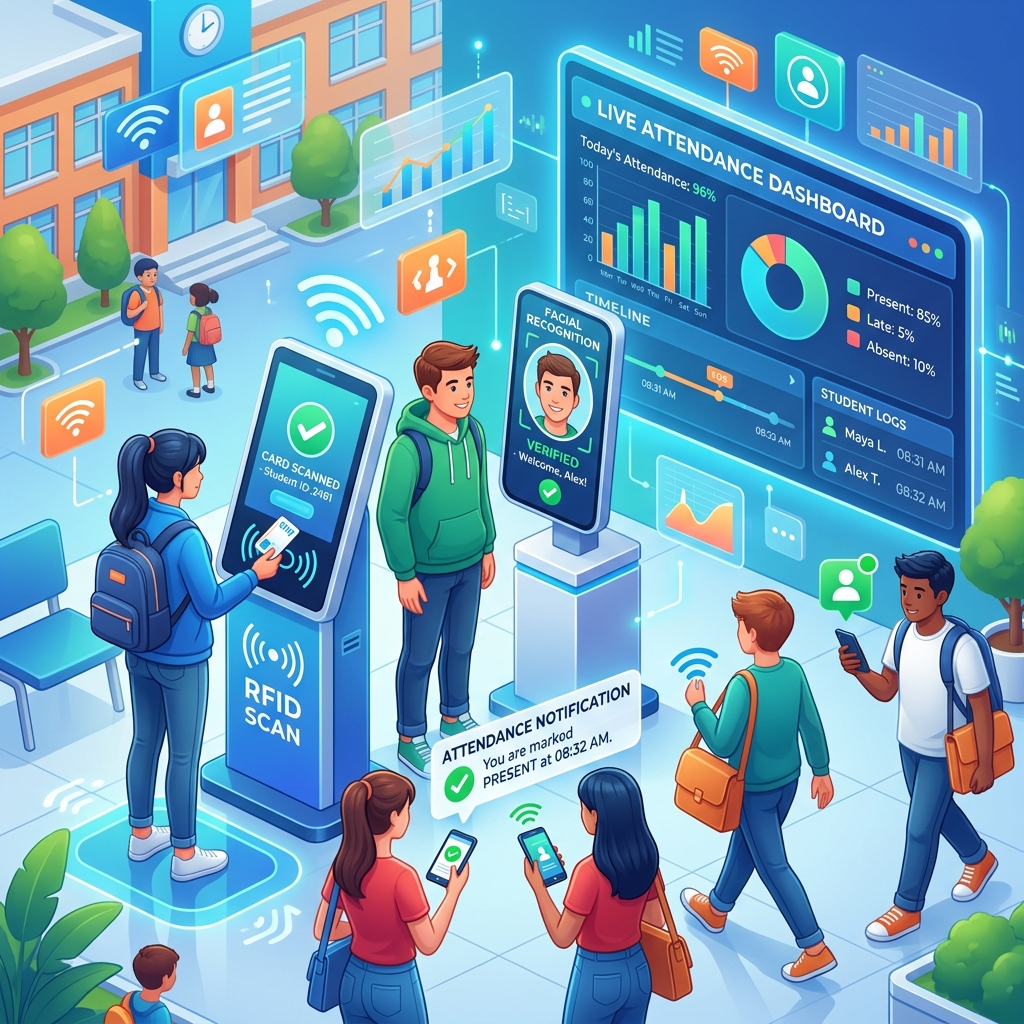
- Dynamic Attendance Tracking: Staff can record student check-ins and check-outs in real-time on tablet devices, ensuring that every student is accounted for, and providing instant roll-call reports during emergency drills.
- Automated Billing & Flexible Plans: Systems process secure credit card payments, calculate sibling discounts, handle recurring billing schedules, and generate tax-compliant end-of-year statements automatically.
For working parents, after-school care is an invaluable lifeline, but it presents schools with complex logistics, attendance tracking, and billing scenarios. Many districts are turning to specialized after school program management software to handle enrollments, emergency contact logs, dietary restrictions, and dynamic tuition payments for extracurricular activities. With this system, parents can log into a secure web portal to register their children for specific enrichment classes, view balance statements, and set up automatic recurring payments. This keeps the program financially sustainable while reducing administrative work for the school’s billing department.
Moreover, the integration of after school program management software with standard student databases ensures that critical medical alerts, such as severe allergies or medication needs, are synced instantly to the after-school staff roster. If a student requires an EpiPen, the after-school coordinator is immediately notified on their mobile attendance app, preventing dangerous communication gaps between the daytime school nurse and the afternoon program instructors. This real-time synchronization protects student health and provides parents with peace of mind knowing their children are safe.
4. Assets, Security, & Emergency Preparedness: Safeguarding the Modern School
A school campus is a busy environment containing millions of dollars in physical assets, while welcoming hundreds of students, staff members, contractors, and visitors through its doors every single day. Protecting these assets from loss and safeguarding the physical safety of everyone on campus are the two most critical responsibilities of any educational administration team. Achieving this level of security requires a multi-layered digital defense system that combines asset tracking, lobby check-in screenings, and real-time emergency broadcast tools.
Maintaining an accurate inventory of physical capital is the main function of school asset management software, which tracks everything from digital smartboards in classrooms to lawnmowers used for campus landscaping. Rather than relying on static spreadsheets that quickly become outdated, this software assigns unique barcodes or RFID tags to every high-value asset. IT technicians can scan assets during routine maintenance, track which teacher has checked out a specific laptop, and monitor exact physical locations across multiple buildings. This minimizes asset shrinkage, simplifies annual tax audits, and ensures that the school’s technology investments are used efficiently.
For daily, consumable resources, using dedicated inventory management software for schools ensures that classrooms never run out of critical learning materials, while simultaneously preventing waste in cafeteria larders. This software tracks stock levels of textbooks, art supplies, science laboratory chemicals, cleaning products, and cafeteria food in real-time. When inventory levels drop below a pre-set threshold, the system automatically generates purchase orders to pre-approved vendors, ensuring that learning is never interrupted by a lack of essential supplies, while avoiding the cash-flow drain of over-ordering materials.
| Security Module | Core Operational Function | Direct Impact on Campus Safety |
|---|---|---|
| Visitor Management | Deploys advanced school visitor management software to screen visitors, scan government IDs, print badges, and check sex offender registries. | Restricts access for unauthorized individuals and maintains a complete digital log of all external guests. |
| Asset Tracking | Uses school asset management software to track high-value physical capital, laptops, sports gear, and laboratory tools using RFID/Barcodes. | Prevents theft, optimizes hardware investments, and ensures proper equipment maintenance histories. |
| Consumable Inventory | Monitors consumables (books, safety gear, lab chemicals) via inventory management software for schools. | Ensures safety gear is stocked and science lab chemicals are properly accounted for and stored. |
| Emergency Alerts | Activates school emergency management software to broadcast critical instructions via SMS, email, PA systems, and digital signs. | Minimizes response times during crises and keeps parents and first responders informed in real-time. |
Lobbies and reception areas are the first line of defense for student safety, which is why deploying high-tech school visitor management software has become a modern educational security standard. When a parent, contractor, or visitor arrives at the school lobby, they must present a government-issued photo ID. The receptionist scans the ID through a visitor check-in kiosk, which instantly checks the credentials against national sex offender databases, active custodial restriction orders, and custom school watchlists. Within seconds, the system either flags the receptionist or prints a high-visibility visitor badge complete with the visitor’s photo, destination, and access expiration time.
This automated check-in process eliminates the errors associated with paper visitor sign-in sheets, which can be easily falsified or read by other visitors, compromising privacy. In addition, modern school visitor management software maintains a secure digital record of every visit. If an incident occurs, administrators can easily run reports showing exactly who was in the building, when they arrived, and which staff member they visited, making it a valuable tool for post-incident investigations and safety audits.
In times of critical incidents, having school emergency management software installed can save lives by enabling instant, multi-channel broadcasts to parents, staff, and local first responders. During a weather emergency, medical crisis, or security incident, administrative staff can activate a pre-configured emergency protocol with a single click on a desktop or mobile device. The system instantly broadcasts emergency alerts through SMS text messages, emails, automated voice calls, classroom smartboards, computer screens, PA systems, and lobby digital signs, ensuring the message reaches everyone immediately.
Furthermore, school emergency management software provides teachers with a mobile dashboard to account for their students during evacuations or lockdowns. Teachers can quickly mark students as “safe,” “missing,” or “injured” directly on their mobile phones, allowing the central command center to coordinate safety efforts in real-time. The system also shares real-time campus maps, floor plans, and security camera feeds with local police, fire, and medical teams, giving them the vital information they need before they even arrive on scene. This coordinated response significantly reduces confusion and protects student and staff safety.
5. Student Transportation & Fleet Logistics: Software on the Move
For thousands of students, the school day starts and ends on a yellow bus. Managing a large student transportation network is a massive logistical challenge, involving route planning, fuel budgeting, driver schedules, vehicle maintenance, and safety compliance. Doing this manually or with basic spreadsheets is highly inefficient and creates significant safety risks. A single routing error can leave children waiting at dark stops for too long, while poor fleet maintenance can lead to breakdowns that disrupt school schedules and impact families.
To manage the immense liability and high operational costs of student transportation, administrators rely on advanced school bus fleet management software to optimize routing and track vehicle diagnostic codes in real-time. The software integrates directly with on-board vehicle sensors, collecting continuous data on engine health, brake wear, tire pressure, and battery charge. When a vehicle sensor detects a potential issue, the system alerts the fleet manager to schedule repairs before a breakdown occurs, keeping the school’s fleet running safely and efficiently.
Additionally, school bus fleet management software monitors driver behavior, tracking speed, hard braking, rapid acceleration, and engine idling. Fleet managers can use this data to provide targeted safety coaching, reduce fuel consumption, and lower carbon emissions. By promoting safe driving habits and maintaining vehicles in top condition, school districts can reduce fuel costs by up to 15% and extend the overall lifespan of their transit vehicles by several years, making the transportation budget go much further.
Beyond vehicle upkeep, student safety during transit is a major focus. Modern transportation dashboards integrate directly with school safety and disciplinary databases. If an incident occurs on a bus, the driver can log the details through a mobile interface at the end of their shift. This logs the issue in the central student database and alerts school administrators and parents, helping address student behavior problems quickly and maintaining a safe environment on school bus routes.
Driver compliance is also managed automatically by the software. High-quality school bus fleet management software tracks driver licensing records, commercial driver’s license (CDL) renewals, annual physical exams, background check schedules, and mandatory drug screenings. If a driver’s CDL is within 30 days of expiration, the system automatically alerts the driver and the transportation director, ensuring only fully qualified, compliant drivers operate school vehicles and protecting the district from compliance liabilities.
Operational Workflows of Modern Student Transportation
Modern transportation systems combine fleet maintenance with real-time routing to ensure student safety and efficiency:
- Dynamic Routing: Advanced algorithms in school bus management software analyze student addresses, road conditions, and traffic patterns to generate the most efficient routes. This reduces overall travel time and fuel consumption.
- Real-Time Parent Tracking: The system shares GPS data with a secure parent portal, allowing families to see exactly when the bus will arrive, reducing parent anxiety and phone calls to the school office.
- Emergency Student Manifests: Digital student card readers record exactly when and where each student boards and exits the bus, giving administrators real-time student manifests during transit emergencies.
By putting a robust school bus management software in place, districts can provide parents with real-time GPS tracking apps, so they know exactly when their child’s bus will arrive. This eliminates the uncertainty of waiting at school bus stops in freezing winter weather or pouring rain. The parent app sends secure, automated alerts when the bus is five minutes away, allowing families to time their drop-offs and pick-ups perfectly, reducing student wait times and improving overall safety.
Routing algorithms within modern school bus management software use advanced pathfinding mathematics similar to the classic traveling salesperson problem. The system calculates paths that maximize fuel efficiency while avoiding high-risk traffic areas like dangerous left turns across busy multi-lane roads, active railway crossings, or known accident hotspots. This mathematical optimization keeps student travel times short, reduces fuel waste, and minimizes accident risks during the daily commute.
For school administrators, school bus management software provides valuable real-time visibility. If a bus is delayed by traffic, road construction, or a minor mechanical issue, the transportation coordinator is notified immediately. They can send out instant email or SMS updates to parents along that route, explaining the delay and providing an updated arrival time. This proactive communication prevents parent panic, reduces incoming calls to the school office, and allows school staff to handle transit delays smoothly and professionally.
6. Keeping Up: Insights from School Management Software News
The educational technology industry is evolving rapidly, driven by advancements in cloud computing, artificial intelligence (AI), data security, and mobile communication. School administrators, technology directors, and facilities managers must stay informed about these emerging trends to ensure their institutions do not fall behind, adopt outdated technologies, or expose themselves to data security risks. Keeping a close eye on the latest school management software news is essential for making informed long-term software decisions.
One major trend highlighted in school management software news is the rapid shift away from local, on-premise servers toward fully cloud-hosted software-as-a-service (SaaS) platforms. Cloud hosting offers substantial benefits, including automatic updates, high-grade data encryption, and remote access for administrators and parents. It also eliminates the need for expensive server hardware on campus, reducing utility bills and IT maintenance workloads, and allowing tech teams to focus on supporting teachers and students in the classroom.
Another prominent topic in school management software news is the growing integration of AI and machine learning into daily administrative workflows. AI algorithms can analyze years of school data to predict which students may need additional academic support, automate complex course scheduling, and optimize building energy usage based on real-time classroom bookings. These smart features allow schools to work more efficiently, automate repetitive tasks, and use data-driven insights to improve student outcomes and lower operational costs.
Additionally, data privacy regulations and cybersecurity remain critical topics in industry discussions. As educational institutions collect more digital data, protecting student records from cyber threats has become a top priority. Modern administrative software must follow strict security standards like SOC 2, and comply with legal frameworks such as FERPA and GDPR. Security-focused updates highlight how platforms use advanced features like multi-factor authentication (MFA), continuous vulnerability scanning, and end-to-end data encryption to secure student information and keep schools safe from data breaches.
7. Enterprise Selection & Implementation Methodology
Choosing and implementing a new school management system is a major project that requires careful planning, stakeholder buy-in, and a structured migration strategy. Many software implementations fail not because of the software itself, but because of poor user training, inadequate data migration, or a lack of clear goals. Following a proven step-by-step selection and deployment process is the key to ensuring a smooth transition and a strong return on your software investment.
The process begins by forming a cross-functional selection committee that includes representatives from every department, including academic deans, IT directors, finance officers, facilities managers, transportation coordinators, and parent representatives. This committee is responsible for defining the institution’s unique requirements, evaluating potential vendors, and ensuring that the selected platform meets the needs of all users. This collaborative approach helps prevent post-purchase frustrations and ensures that the new system is embraced across the entire institution.
Once a platform is chosen, the implementation team must focus on data migration and staff training. Migrating historical student records, financial data, asset inventories, and facilities schedules from legacy databases is a delicate task that requires meticulous planning and validation. In addition, the school must provide comprehensive, role-specific training sessions for all users—ranging from teachers learning the new grade-book to cafeteria staff using the inventory portal—ensuring everyone is comfortable and proficient with the new system before it goes live.
Step-by-Step Implementation Framework
Ensure a successful, stress-free transition by following this structured deployment checklist:
- Needs Assessment & Committee Formation: Form your cross-functional selection committee and document the specific requirements and pain points of each department.
- Detailed Vendor Evaluation: Request detailed demonstrations, check references, and verify that the platform complies with all data privacy and security regulations.
- Structured Data Migration: Clean and format historical data before migrating it, running extensive testing to ensure complete accuracy.
- Role-Specific User Training: Provide tailored, hands-on training sessions for teachers, administrators, facilities teams, and bus drivers.
- Phased Deployment Strategy: Consider launching the new system in phases (e.g., launching facilities first, then student billing, followed by transportation) to make the transition manageable.
- Continuous Support & Optimization: Gather feedback regularly and work with your vendor to implement updates and refine workflows.
Frequently Asked Questions (FAQ)
-
Q: Can facilities management software for schools integrate directly with school visitor management software?
A: Yes! Modern platforms integrate these two modules seamlessly. When a maintenance contractor is scheduled for repairs using facilities management software for schools, their visit record is automatically shared with the lobby receptionist’s school visitor management software, ensuring they are expected, checked in quickly, and issued a temporary security badge.
-
Q: Why should a school invest in after school program management software rather than using standard registration tools?
A: Generic registration systems lack the deep operational features required to run school programs safely and efficiently. Dedicated after school program management software handles complex school-specific needs, such as tracking student allergies, processing recurring tuition payments, generating detailed medical emergency contact rosters, and maintaining real-time attendance logs that comply with child-care licensing standards.
-
Q: How does school emergency management software coordinate with local first responders?
A: In a crisis, the software can automatically share a secure digital dashboard with emergency personnel. This dashboard includes real-time campus floor plans, current room-by-room student statuses, evacuation status reports, and active security camera links. This vital data allows police, fire, and medical teams to coordinate their response efficiently and safely before arriving on scene.
-
Q: What is the main difference between school asset management software and inventory management software for schools?
A: The difference comes down to the lifespan of the assets. School asset management software tracks high-value, long-term items (e.g., smartboards, school buses, computers) that depreciate over time. In contrast, inventory management software for schools monitors daily, consumable supplies (e.g., printer paper, science chemicals, cafeteria ingredients) that are used up and reordered frequently.
-
Q: How does school bus fleet management software lower fuel and maintenance costs?
A: It achieves this by tracking engine diagnostics in real-time and optimizing bus routes. The software monitors key indicators like tire pressure, engine heat, and brake wear to schedule preventive maintenance, preventing costly breakdowns. Additionally, its route optimization tools design the most efficient paths, reducing driving time, fuel usage, and overall wear on the vehicles.
-
Q: How does a unified school management platform comply with strict student data privacy regulations like FERPA and GDPR?
A: Student privacy compliance is built into the system using role-based access controls (RBAC). This ensures that only authorized staff members can view sensitive student records. For instance, a school nurse can view immunization records but cannot see student billing details, while a bus driver can access emergency contact numbers without seeing academic grades. In addition, all data is encrypted both in transit and at rest, and detailed system logs track every record change to maintain full audit transparency.
-
Q: What happens if the school’s internet goes down? Can cloud-based systems still function?
A: Yes. Modern, enterprise-grade educational platforms include offline synchronization capabilities. If a local internet outage occurs, key modules like lobby security and visitor badges, after-school student attendance, and bus tracking can run locally on mobile tablets and devices. As soon as the internet connection is restored, the offline devices automatically sync their local data back to the secure cloud, preventing data loss and operational interruptions.
-
Q: What is the average timeline for implementing a complete school system rollout?
A: A full system implementation across a mid-sized district typically takes between 12 to 18 months, depending on the complexity of your existing systems. To ensure a smooth transition, we recommend a phased rollout. For example, schools can implement academic records and registration in Phase 1, deploy facilities and asset management in Phase 2, and launch transportation tracking in Phase 3. This phased approach allows staff to learn the system gradually and prevents operational friction.
-
Q: How does school software integrate with digital classroom hardware like smartboards and tablets?
A: Integration is handled using secure Application Programming Interfaces (APIs) and Mobile Device Management (MDM) hooks. When a student registers for a course, the system automatically creates their personal log-in profile on classroom smartboards and assigns the appropriate digital textbooks to their student tablet, ensuring that learning resources are ready for the first day of class without manual setup.